TLDR; I rewrote Ensembles — my 13-year-old Objective-C sync framework — in Swift 6, using Claude Code. It now supports SwiftData, has new backends, and is in public beta.
Way back in 2013, I was trying to ship cloud sync in a predecessor to Studies app. I’d been using Apple’s iCloud Core Data sync, and it was a disaster. Data corrupted silently. Devices diverged and never recovered. I spent more time debugging Apple’s sync than building the app.
So I what any level-headed developer would do — I reverse engineered it. I dug into what Apple was doing under the hood, figured out the design problems, and built my own replacement. I called it Ensembles, and pushed it to GitHub at GOTO Aarhus later that year.
The core idea behind Ensembles is that sync doesn’t need a central server. Each device keeps its own copy of the Core Data store. The framework watches your saves, generates compact change logs, and when changes arrive from another device, it merges them in. There’s no server that understands your data model. No hosting costs. Each device is an equal peer.
In 2013, nobody had a word for this. It was just “sync.” I released an open source version of Ensembles, and a little later a more capable commercial version called Ensembles 2, with CloudKit support, better memory usage, and additional backends.
More recently, the web community has started to embrace this approach and given it a name: local-first. I attended the inaugural Local-First Conf in Berlin in 2024, and gave a short talk about my journey with Ensembles — at that point more than 10 years old. It was good to see so much energy around ideas that some of us had relied on for a long time. And it’s great having a word for it; it means you can talk about it, have a conference about it, and push the idea forward.
An old framework in a new world
The original Ensembles was written in Objective-C. It worked with Core Data. The code was solid and I was still maintaining it, but the world had moved on. Apple introduced SwiftData. The community adopted Swift 6 with strict concurrency. Nobody starts a new Objective-C project in 2026.
I was expecting a long, slow decline. Keep it compiling, fix the odd issue, watch it fade out.
What if?
Then about a week ago, I had an idea: what if I used Claude Code to rewrite Ensembles in Swift 6?
Not a wrapper around the old code. A real rewrite — async/await, Sendable types, structured concurrency. And while I was at it, add some new backends. Maybe even try SwiftData support alongside Core Data.
A week later
Within a day, the core Swift rewrite was compiling and passing tests. I directed Claude Code throughout — correcting mistakes, steering it away from bad decisions. It made plenty of them. But the Ensembles architecture mapped reasonably well to Swift, which helped.
One thing that made this feasible: Ensembles had extensive tests. Without those, I wouldn’t have attempted it. When you’re rewriting a sync framework — where bugs mean data loss — you need to know things actually work. The tests were the safety net. Claude Code would produce Swift code, the tests would catch problems, and I’d fix things up. Without that feedback loop, this would have been reckless.
By the second day, I was adding backends. Then SwiftData support came together. The rest of the week was cleanup — licensing, documentation, more tests — and now Ensembles 3 is in beta.
What Ensembles 3 is
For anyone who hasn’t used the original: Ensembles is a peer-to-peer sync framework for Apple platforms. You add it to your app, point it at your Core Data or SwiftData store, choose a backend, and your data syncs across devices. No server development. No vendor lock-in.
The architecture hasn’t changed. What’s new:
Pure Swift 6, with structured concurrency support
SwiftData support, alongside Core Data
More backends than before
Same decentralized, local-first architecture — no central server required
The AI in the room
I know a lot of people are angry about LLMs, and with good reason. I wrote a bleak post in January about what they’re doing to our industry. I stand by that.
But this rewrite would have taken months on my own. I wasn’t going to do that. Ensembles was heading for a quiet retirement. Now it isn’t.
I don’t want to overstate it. I made every architectural decision. I know the Ensembles codebase inside out — I designed it. Claude Code handled the mechanical translation, but it needed constant correction. This isn’t a story about AI replacing a developer. It’s more mundane than that: a tool that sped up a particular kind of grunt work.
I’m not going to tell anyone how to feel about that. But in this case, the result is a framework that wouldn’t exist otherwise.
Give it a try
Ensembles 3 is on GitHub. It’s a beta, so expect rough edges. If you have a Core Data or SwiftData app and want local-first sync without running a server, take a look.
This post is the result of a lot of thinking. It’s not very uplifting, but it is where I am right now.
It is presented in two versions: the first is written entirely by yours truly, and the second is constructed from the same ideas, as written by an LLM.
Why? No idea. Just seemed like an interesting experiment.
Drew McCormack
I’ve been more depressed in the last two months than at any time I can remember. Sure, it was triggered by Trump, but it’s bigger than that…
It feels like Democracy is failing. It started with the 2016 election, but a lot of us were not really paying attention, and just thought of it as an odd detour in history.
Early days
It wasn’t. The Russians and others discovered something important: you can program social media like you can program a machine.
It’s as close as you can get to mind control: Feed them lies. Feed them the truth. Feed them things they like. Feed them things they hate. Measure, optimize, rinse and repeat. You can literally calibrate a society to your goals!
Those were the early days, when you still needed software developers to write the code for the bots, and people to setup fake accounts. LLMs have made that ancient history.
Where we are at
Today’s machine is much more advanced. It can manipulate voters to swing elections, and — in a bizarre non-linear way — it can even alter the social media networks themselves through political pressure.
And you don’t need AGI (Artificial General Intelligence) to do it. The current state of the art is sufficient. Hybrid intelligence. The bionic brain. A human enhanced by an LLM.
An LLM buddy
I’m not just spouting hatred about something I have no experience with. I’ve spent the last few months working almost exclusively with LLMs.
Working with an LLM as a programmer is an entirely different experience to programming alone.
For example, I just spent a day building quite a powerful tool with Python. I must have only written about 10 lines of Python in the last 20 years, and I didn’t need to write a single line for this project. And yet, there it is; the tool; doing what I wanted it to do.
The LLM didn’t do it alone either. I didn’t just leave it with a single instruction and go home for the day — I guided it every step of the way.
Sometimes it did stupid stuff, like a student wet under the ears, but I told it so, and it did better. Occasionally it would take 5-6 attempts to get it to produce something that I was satisfied with.
But the net result is astonishing. There is no doubt. I would never have made a tool like this before the advent of LLMs.
Old way, new way
It is not that I couldn’t have figured it out on my own; there was nothing there that was beyond my intellect.
There were many practical details which I did not have knowledge of, but a few years back, with Google in hand, I could have slowly unpicked the problem. I think it would have taken me at least a week. Instead, I finished it in around 6 hours.
So though I could have built this tool before, it is very unlikely I would have. I would have needed a very good reason to spend a week doing it. As it is, the tool is quite frivolous, so I would never have even started.
Now I can build frivolous tools at will!
Changing industries
So it is going to change everything in my industry, and likely in many others. And that raises questions. To begin with, Do I still want to work in this “new” job?
I don’t know. It is exhilarating in some ways to tell something to do something, and then minutes later have it done, and work as envisaged.
On the other hand, it definitely feels less valuable. Like being the operator of a furniture making robot instead of a skilled carpenter. It’s a completely different job — you need the understanding of a carpenter, but not the skills.
Changing societies
But changing jobs is not what worries me the most. That has overcome many industries before (including furniture making carpentry!). It’s painful for the afflicted group, but people generally move on and find something else to do.
I don’t think it will be like that this time. For a start, there may not be much to move on to. AI will advance, and even if it is not “intelligent” in itself, it will be able to take over a lot of tasks.
Utopia
So we can all retire and enjoy great lives, right?!
I wish I was that optimistic.
Social media gave Trump the win in 2016, and it introduced the programmable society. Things have advanced quickly, and your opinion is now being constantly manipulated. Human beings have not evolved to handle this.
I’m worried for democracy. It’s a great system when people are left to make up their own minds, but democracy is fast becoming a programmable machine. People are too easily manipulated. We see it in the US, but equally in virtually every democratic society on Earth. The combination of AI with the syringe of social media is lethal.
(Ironically, less “free” countries like China may end up doing better, because if their leaders see the threat, they can quite easily enforce a new direction. In a democracy, bad players can hijack the state for their own benefit.)
Depressed
So I’m depressed. I’ve already lost friends over this: I just can’t talk to them anymore, the political divide has opened so wide.
Sooner or later I will have lost a job, and I’m not sure I want the one that comes next.
But most of all, we’re fast losing our freedom. I’m not even American, but I feel it from here in Europe. It feels like we have all lost.
Too late?
Can it be stopped? Part of me hopes people will just wake up to it. Some already have, leaving social media for Mastodon, or whatever.
But these tend to be a minority who grasp the situation, and the majority probably don’t have the insight to deal with it at this point. They are just drowning in the pace of change. Perhaps people will adapt in time. Let’s hope.
An AI Vaccine?
I also wonder if AI itself might not end up providing a remedy. The world has always been afflicted by new challenges, from malware to Corona virus. Human’s usually come up with the antidote.
Maybe the remedy here is software that is looking over your shoulder, seeing your screen, and warning you when it is manipulative. Software fighting software. A junk mail folder for the world.
Common Sense
I want to believe people can pull themselves out of this. I don’t want to live in a George Orwell novel. (How prescient was that guy?!)
As it is, I don’t trust our governments, and I don’t trust our companies. And my job keeps me awake at night.
I’m at loggerheads with myself.
How are things with you?
An LLM Version
I’ve been depressed. A lot. It started with Trump, but it’s not about Trump. It’s about watching democracy fail in slow motion. The cracks began in 2016—Russian hacking, the weaponization of social media, the realization that we’d built a machine that could be programmed to manipulate minds. Feed people lies. Feed them truth. Feed them what they love, what they hate. Measure their reactions. Optimize. Repeat. These were the early days of the machine, a crude prototype fueled by rage and algorithms.
Now, it’s nearly complete.
I’m not even worried about AGI—artificial general intelligence. That’s a fairy tale, or a nightmare, depending on who you ask. If it’s real, we’re probably doomed anyway. What scares me is the hybrid: the bionic brain. Humans working with AI, refining manipulation into an art form.
I’ve spent the last few months working almost exclusively with AI. And it’s left me hollow.
Here’s an example: I built a powerful Python tool recently. Not a single line of code came from me. The LLM didn’t do it alone, either. I guided it, step by step, like a teacher correcting a clueless student. It made stupid mistakes. I called them out. Five, six attempts later, it spit out something usable. The result? Astounding. A tool I’d never have built before. Not because I couldn’t understand it—there’s nothing here beyond my intellect. But the practical details? The time? A week of Googling, debugging, rage-quitting. I don’t have a week to waste on “frivolous” tools anymore.
This changes everything. Not just programming. Every industry.
Is this still my job? Sometimes it’s exhilarating—watching an idea materialize in minutes. But it feels… cheap. Like replacing a carpenter with a furniture-making robot. You need the mind of a craftsman, but not the hands. The value’s gone.
But displacement isn’t the worst of it. We’ve survived automation before. People adapt. This time? There might not be anything left to adapt to. AI doesn’t need consciousness to take over tasks. And while we’re arguing about UBI and early retirement, the real crisis is unfolding elsewhere.
Democracy is a machine now, too. Programmable.
Social media gave us Trump. It proved you could hack human minds at scale. Now, imagine that power refined by AI—opinions shaped in real time, fears and desires micro-targeted, truths and lies indistinguishable. We haven’t evolved to handle this. Neither has democracy. It relies on people making their own choices. What happens when those choices aren’t theirs anymore?
The U.S. is crumbling, but it’s not alone. Authoritarian regimes might fare better. China’s leaders can pivot overnight if they sense threat. In democracies? Bad actors hijack the system. And they have.
I’ve lost friends over this. The political divide isn’t just wide—it’s algorithmic. We’re living in different realities. I’ll probably lose my job next, or morph into something I don’t recognize. But more than anything, I’ve lost the illusion of freedom.
Can it be stopped? Maybe if people wake up. Some flee to Mastodon or shun social media entirely. But that’s a privileged few. The rest don’t have the tools, or the will. Maybe AI will save us—software fighting software, a spam filter for reality. Or maybe we’ll just… surrender.
I don’t trust governments. I don’t trust corporations. My job—this strange, soulless collaboration with machines—keeps me awake at night. Orwell saw it coming. I just never thought I’d live it.
And so we arrive at the final station. This series on replicating types in Swift ends with this post. I will no doubt revisit various aspects of replicating types in other posts, but we are closing out the series proper here.
To recap, we have moved through Conflict Free Replicated Data Types (CRDTs) from the perspective of a Swift app developer, beginning with what they are and why they are useful, the mathematical features they must possess, the tricks and tools you can use to build them, and finishing with a series of posts on different types of CRDTs, from basic register types that are well suited to simple atomic properties, up to more complex array and dictionary types capable of recursive merging.
In this post, I’ll bring all of this together into a real world app. We won’t concentrate on details of SwiftUI or Combine, which are used throughout the app, but the code is there if these aspects intrigue you. Instead, the focus will be on model and data handling.
The app in question is a distributed data, note taking app. Unlike an app like eg Slack, which are built around a central server, this app allows edits to be made on any device, even if you are offline for days. Even better, when changes are synced up, edits get merged together in ways that seem logical to the user. When you make two different spelling corrections to the same note on two different devices, both corrections will survive the sync.
Introducing Decent Notes
Our decentralized app has to have a name; in line with the focus of this site, and the wholesome goodness of all Swift developers, the only name that fit was “Decent Notes”. It’s a simple enough app with some somewhat perplexing features that have been introduced purely for the educational purpose of accentuating the usage of the replicating types in our toolkit.
Of course, Decent Notes allows you to add and delete notes, and reorder them. In the note editing screen, you can set a title, and edit the note’s text, but you can also set a note priority, and choose from a few fixed tags, such as “Work” and “Home”.
Decent Notes allows you to add, remove and reorder your notes, and add a title, priority and some tags.
Each of these features is backed by an appropriate replicating data type. A title, which can be treated as a single atomic string, will be handled differently to the body of note content, where we want edits to be merged when they happen concurrently. We’ll choose replicating types appropriate for our goals in each case.
Running Decent Notes Yourself
The source code is available on GitHub. The app uses CloudKit to transfer data between devices. To build your own copy, you need to change a few things:
Change the app bundle id to one in your own App Store Connect account (egcom.mycompany.decentnotes).
Go into the Capabilities tab of the app target, and make sure that iCloud is active, with CloudKit checked, and set the container identifier there (egiCloud.com.mycompany.decentnotes).
Finally, locate the source file AppStorage.swift and, in the function makeCloudStore, replace the existing iCloud container with the one you just set.
To build and run Decent Notes, first update the bundle id and iCloud container to work with your App Store Connect account.
A Decent Note
The goal is to build up a model for Decent Notes out of replicating types, such that the model itself is effectively one big replicating type. To keep things simple, we will just store all data for all notes in one file, and sync it to CloudKit as a single file. In a shipping app, you would have to think more about how to partition the data into smaller chunks, to reduce the memory footprint, and the transfer load to and from the cloud.
The main model type is the Note.
struct Note: Identifiable, Replicable, Codable, Equatable {

    enum Priority: Int, Codable {
        case low, normal, high
    }

    enum Tag: String, Codable, CaseIterable {
        case home, work, travel, leisure
    }

    var id: UUID = .init()
    var title: ReplicatingRegister<String> = .init("")
    var text: ReplicatingArray<Character> = .init()
    var tags: ReplicatingSet<Tag> = .init()
    var priority: ReplicatingRegister<Priority> = .init(.normal)
    var creationDate: Date = .init()
Two of these properties are not like the others. Notice that id and creationDate don’t seem to be replicable at all. In actual fact, they are, because immutable types can replicate by default. When you create a new note, the two properties are set, and they never change again. They are simply copied. Merging constant properties is trivial, because the merging values should always be the same.
I’ve chosen to use a register for the title. This will mean changes are atomic — there will be no partial merging. One of the two merged values will always win, and changes made in the other will be discarded. For a simple string like a title, this is acceptable. If it is important to your app to allow partial merges, you could use a ReplicatingArray for the title, just as for the content text, with the knowledge that there is a cost to that in data size.
The main text of the note is built on the ReplicatingArray, with Character as the element type.
var text: ReplicatingArray<Character> = .init()
We want to allow simultaneous edits to be merged in a logical way for the user. This approach would even work for a multiple user, collaborative text editor like Google Docs.
The tags and priority properties have been included mostly for educational purposes.
    var tags: ReplicatingSet<Tag> = .init()
    var priority: ReplicatingRegister<Priority> = .init(.normal)
The tags demonstrate how you could use a replicating set type. You can add and remove tags on different devices, and have those partial changes merged together, rather than one set of changes overriding the other, as would be the case with a register type.
The priority is different. For that, we do want an atomic outcome. If you chose a priority of 1 on your iPhone, and 2 on your iPad, we don’t want the merged result to be 1.5. No, one of the two has to win. It has to be an atomic outcome, and a register is appropriate for that.
A Decent NoteBook
The other part of the model is the NoteBook. This is what contains the collection of notes.
This code is complicated a little by the use of a versionId. This is just a UUID that is changed every time an edit is made. The purpose of it is simply to quickly identify if a change has been made since the last time we synced, so we can determine if an upload is needed. If we compare the current versionId to the one we know is in the cloud, we know if the data needs to be uploaded again or not.
There are two main properties used in NoteBook. The first is a replicating dictionary which holds the actual notes: notesByIdentifier. To track the order of notes, so we can support manual sorting and moving, we have the orderedNoteIdentifiers replicating array.
I can hear some of you protesting from here: “Why not just put the notes in a replicating array, and you are done?”. The problem is that the array type doesn’t understand identity. If we made changes to a note, and updated the array, it would effectively save it as a new note, deleting the original one. We would lose all the advantages of partial merging that CRDTs provide.
As we saw in an earlier post, the ReplicatingDictionary type has the nice property that when the values are themselves Replicable, corresponding entries will get properly merged. This is essential to having our decentralized notes syncing up how the user expects them to.
Decent Syncing
The CloudStore.swift file does the heavy lifting of uploading the data to CloudKit, and downloading what other devices have uploaded. The code uses Combine heavily, and we won’t go into it. You can read a little about it here, and perhaps I will cover it in more depth in other posts. For now, we just take for granted that it will do its job properly.
When data is downloaded by the CloudStore class, it informs the DataStore object, which unpacks it using a JSONDecoder, and then merges the remote data with the local.
That is simple enough. It is saving the version id we discussed earlier, then merges and saves the local noteBook with that from the cloud.
The merging code of the NoteBook type is the devil in the details.
    func merged(with other: NoteBook) -> NoteBook {
        var new = self

        new.notesByIdentifier = notesByIdentifier.merged(with: other.notesByIdentifier)

        // Make sure there are no duplicates in the note identifiers.
        // Also confirm that a note exists for each identifier.
        // Begin by gathering the indices of the duplicates or invalid ids.
        let orderedIds = orderedNoteIdentifiers.merged(with: other.orderedNoteIdentifiers)
        var encounteredIds = Set<Note.ID>()
        var indicesForRemoval: [Int] = []
        for (i, id) in orderedIds.enumerated() {
            if !encounteredIds.insert(id).inserted || new.notesByIdentifier[id] == nil {
                indicesForRemoval.append(i)
            }
        }

        // Remove the non-unique entries in reverse order, so indices are valid
        var uniqueIds = orderedIds
        for i in indicesForRemoval.reversed() {
            uniqueIds.remove(at: i)
        }
        new.orderedNoteIdentifiers = uniqueIds

        return new
    }
This is more code than I would like. In theory, this could be reduced down to two simple calls to the merged function, like this…
    var new = self
    new.notesByIdentifier = notesByIdentifier.merged(with: other.notesByIdentifier)
    new.orderedNoteIdentifiers = orderedNoteIdentifiers.merged(with: other.orderedNoteIdentifiers)
    return new
So what’s the problem? Why can’t we have our 4 line merging function?
When ReplicatingArray is Indecent
The problem really comes down to using a ReplicatingArray to track the sort order. As already mentioned, the array type doesn’t have any concept of identity, so there are situations where seemingly straightforward edits can lead to duplicate entries.
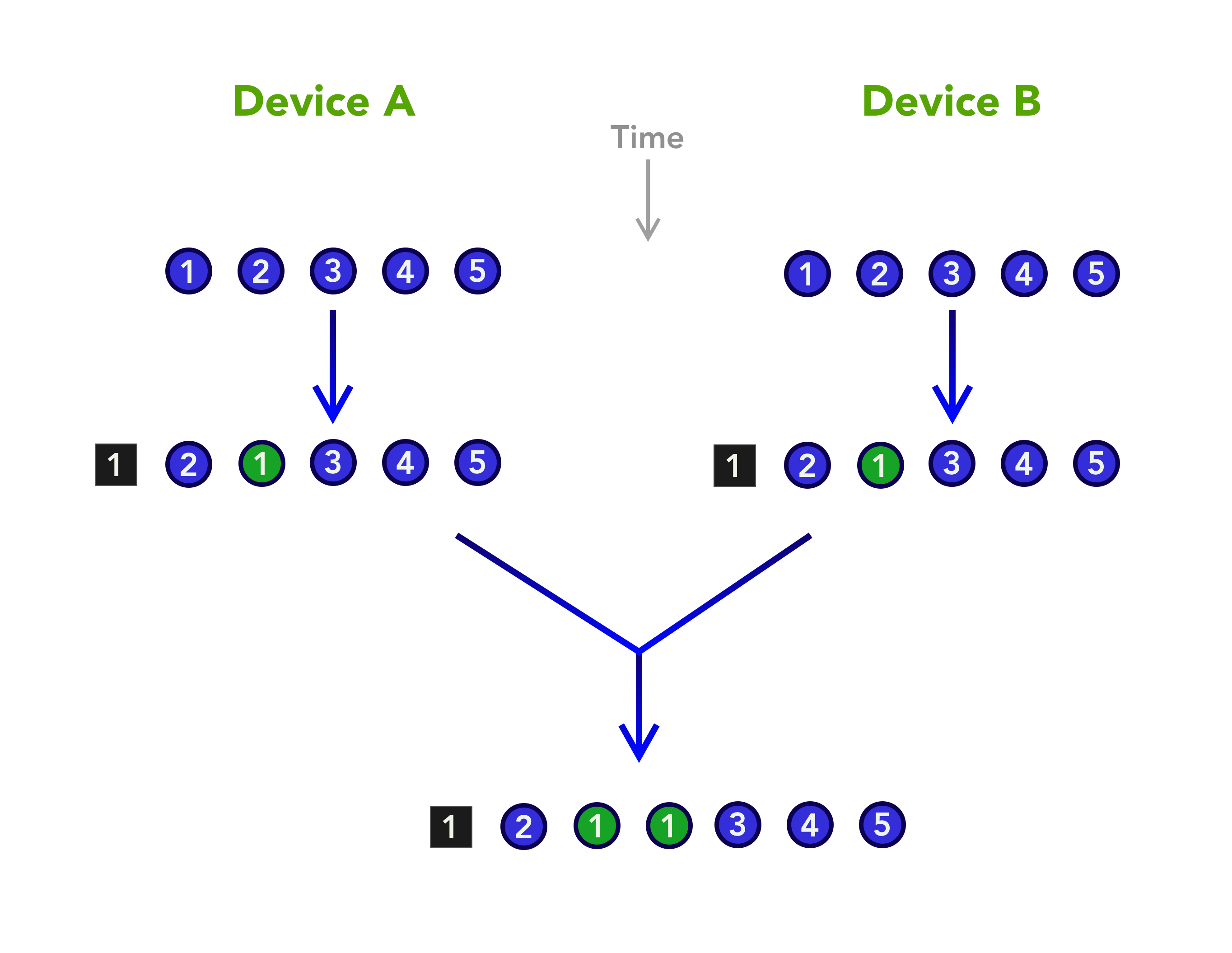
To see how, imagine we begin with the array of identifiers fully synced up on two devices. On the first device we then move the first Note to the second position, and — at the same time — we do the same on the other device. The ReplicatingArray records these changes not as moves, but as deletions and insertions. Both devices will record the deletion at the first location, and then will insert a new entry. The problem is, because they each create their own insertion, after things are synced, the identifier of the moved note will be duplicated.
A ReplicatingArray has no concept of identity. A move is achieved by removing an element, and inserting at another location, but this can lead to duplicate copies.
We have used the ReplicatingArray because it is the only ordered type we have in this series, but we would be much better off with a ReplicatingOrderedSet. Such a type could be developed along the lines of the ReplicatingDictionary, and would properly handle identity of entries.
Without a ReplicatingOrderedSet, I have opted instead to use the ReplicatingArray, and to explicitly check for duplicates after a merge. Most of the merge code is there to remove the duplicated entries, and checks consistency with the dictionary of notes. With the right data type at hand, this extra code would not have been needed.
That just leaves the code for merging the Note values themselves. This is trivial. It simply goes through the properties, merging each one.
I mentioned in the beginning that Decent Notes utilizes SwiftUI, and that we wouldn’t be looking into that aspect. That is mostly true. I want to detour a little to consider how we deal with edits in the text editor, to demonstrate that integrating replicating types is not always the same as when you are using standard types.
The problem is that the SwiftUI TextEditor view expects to work with a String. In particular, it uses a binding to a string to get and set its contents. Our model, on the other hand, has a ReplicatingArray<Character>, and expects to be updated with insertions and deletions of characters.
What we don’t want is to simply set the model to the new string every time it changes. This will generate a lot of data, because the ReplicatingArray stores a complete history of edits. It would also mean we will not get any meaningful merging of our replicas — they would behave atomically, like a register.
The trick is to include a bindable string for the TextEditor, but instead of just storing the new string directly in our model, we determine what changed, and apply those changes to the ReplicatingArray.
struct ReplicatingCharactersView: View {
    @Binding var replicatingCharacters: ReplicatingArray<Character>
    private var modelText: String { String(replicatingCharacters.values) }

    @State private var displayedText: String = ""

    var body: some View {
        TextEditor(text: $displayedText)
            .border(Color(white: 0.9))
            .onAppear {
                updateDisplayedTextWithModel()
            }
            .onChange(of: replicatingCharacters) { _ in
                updateDisplayedTextWithModel()
            }
            .onChange(of: displayedText) { _ in
                updateModelFromDisplayedText()
            }
    }
Note the .onAppear and .onChange modifiers; those blocks are called when the text editor first appears, and when properties change. We use these moments to see what changes we need to make in the model.
The functions that get called to establish what changed use the String.difference method to establish what is different between the new string, and the one that is already in the model. The differences are then applied to the model.
    private func updateDisplayedTextWithModel() {
        let modelText = self.modelText
        guard displayedText != modelText else { return }
        displayedText = modelText
    }

    private func updateModelFromDisplayedText() {
        guard displayedText != modelText else { return }
        let diff = displayedText.difference(from: modelText)
        var newChars = replicatingCharacters
        for d in diff {
            switch d {
            case let .insert(offset, element, _):
                newChars.insert(element, at: offset)
            case let .remove(offset, _, _):
                newChars.remove(at: offset)
            }
        }
        replicatingCharacters = newChars
    }
Finishing Up
That’s all folks! In this series, we’ve seen how you can design and create your own replicating data types, and combine them to into full distributed data apps. These types have a data cost, but the payoff is that they make syncing more powerful and easier to implement. They also free your app from lock in — you can sync via any cloud service, and even peer-to-peer.
Where to from here? Start building apps with replicating types. Develop your own types as needed — it’s really not that difficult. In short, go forth and replicate!
It’s an old chestnut that Swift developers love to sink their teeth into: Should you force unwrap optionals? Everyone has an opinion about it, and I’m going to state mine as clearly as I can — forcefully unwrap early and often.
Of course, this is just one opinion. We even disagree about it within our two man Agenda team, so there is probably not much hope for the world. But I want to explain when and why I think it is good to force unwrap, and give a recent real world example that demonstrates the cost of not doing it.
First, my reasoning. I think you should force unwrap in any situation where logic tells you that an optional simply cannot be nil. A standard example might look like this.
var count: Int?
count = 0
print("\(count!)")
Could count end up being nil in this case? Perhaps, through some strange memory corruption or solar flare. Do I want my app to continue to run if count is nil? No. To put it bluntly, that is cancer. The app would be in an undefined state, which may well be dangerous. I don’t want it deleting user data or causing any other havoc — it should just crash. I will be informed of the problem, and it can’t do any more damage.
But what is wrong with the softly, softly approach? Shouldn’t we be defensive here? Here is how you could do it.
var count: Int?
count = 0
if let count = count {
    print("\(count)")
} else {
    print("error!")
}
There are several problems with this. Firstly, it is more verbose, making it more difficult to read. Secondly, and even more importantly, it disguises developer intentions. It says to the next developer “count could conceivably be nil, so we will check for it”, even though it was clear to the original developer that it should never be nil in any well-defined circumstance. Lastly, where is the app at after this code runs? Who knows? The state is completely unclear.
So be assertive with forced unwrapping. If there is no case where the optional should ever be nil, force unwrap. But don’t force unwrap in cases where there is a valid situation in which nil could arise. If a foreseen error could lead to nil, that requires explicit handling.
I mentioned that I wanted to finish off with a recent real-world example. When Apple announced iOS 14 would ship, they only gave about a day’s notice, leaving most of us scrambling to get ready. For Agenda, we had done a lot of work on widgets, but we had never had them in a beta, or extensively tested on the device. That was planned for the week or so that we usually have following release of the Xcode GM, but before the new iOS is available. Alas, in 2020, that was a luxury we didn’t have.
So I merged our branches in Git, and uploaded the binary. Downloaded from TestFlight, and — you guessed it — the widgets were broken. It was just showing a placeholder, which I later learned is what you get when a widget crashes.
I dug into the code, and I found that the problem was an incorrect file path. I had been testing with a special development target, and hadn’t properly tested the production target. The faulty code was as follows:
let identifierSuffix = (Bundle.main.object(forInfoDictionaryKey: "AgendaIdentifierSuffix") as? String) ?? ".development"
It is attempting to get a string from the Info.plist, which it will then use in the aforementioned path, but I had forgotten to put the string in the Info.plist. That wasn’t the real crime though: As you can see, in the case of nil being returned, it tries to play it safe by falling back on the development target’s string.
This was bad. It meant the production app had the wrong path, so it crashed, but I didn’t see the crash until very late in the development cycle, even though it was there the whole time. And the cost? I probably wasted an hour or two uploading the binary, then sluthing the problem. “What’s an hour or two?” I hear you ask. Well, Apple were pushing us to submit our new widget feature so that Agenda could be considered for featuring. I don’t think two hours was enough to jeopardize that, but you never know. I’m sure the App Store is a madhouse on release day.
Here is how I think the code should have been written.
let identifierSuffix = (Bundle.main.object(forInfoDictionaryKey: "AgendaIdentifierSuffix") as? String)!
It is simpler, clearly stating that I am assuming the entry is in the Info.plist, and the widget only works if that assumption is fulfilled. If there is no entry in there, the widget is entirely useless, and should crash before causing more damage. And, with this code, it will crash early in development. I would have discovered the issue as soon as I tried to run a debug version, and fixed it long before it hit the App Store.
(Update: It has been pointed out that the last line of code is a bit convoluted. It would read better as
let identifierSuffix = Bundle.main.object(forInfoDictionaryKey: "AgendaIdentifierSuffix") as! String
That’s very true. I wanted to change the original code as little as possible, to stay on message. The point is the same: defensive coding did more damage than good, and an assertive force-unwrap would have been better.)
WWDC is just around the corner, and most of us will be fully focussed on what happens with SwiftUI. The unveiling last year generated great excitement, but there are still plenty of holes to be filled before it is a solid replacement for UIKit and AppKit (…or even a solid complement).
One of the big questions on my mind is how well the fully declarative approach scales to complex apps. You can already build quite reasonable portal apps for your favorite web service with SwiftUI, which is 90% of the iOS app market, but I am much more interested in the other 10%. Can you build an advanced iOS app or serious macOS app with SwiftUI? Could you develop an app like Keynote or Xcode using SwiftUI?
I spent a lot of time this year — probably more than desirable — working with the framework. At Agenda, we decided to ‘kick the tyres’ by adopting it in a new internal tool that we wanted to develop. The tool was not trivial either: it loaded significant amounts of data, shared it between multiple users with LLVS backed by the CloudKit public store, and allowed collaborative editing and discussion. Effectively, it was like a fully decentralized web app, built with native UI.
Ambitious? Sure. Too ambitious? Undoubtedly. But we learnt a lot before abandoning the idea. And it did actually work, though after a while we concluded ironing out the performance issues was not really worth the effort.
And this brings me back to the present day, and what we should be looking for at WWDC. One thing I learned from our SwiftUI tool is that a fully declarative style presents some performance challenges. By its nature, SwiftUI is based around view tree diff-ing. When something in the model changes, it triggers a binding to fire, which in turn invalidates the view tree. In order to update the screen, SwiftUI now compares the new tree with the old, and determines what changes are needed to the scene that the user sees.
This process is fast for a few standard views, but there are bigger challenges looming. For example, take a large array of values that you want to present in a List. We encountered some serious performance issues when updating data in such a List, as SwiftUI would attempt to diff thousands of View nodes. You could restructure your UI in order to avoid such large lists, but that is a bit of a cop out, because the technologies SwiftUI is designed to supplant can handle such large lists.
The problem is perhaps even more apparent in a text view. We briefly saw a TextView type appear during the SwiftUI beta in 2019, but it didn’t make the final release. My guess — and it is just a guess — is that someone in Apple concluded that it worked fine if you were presenting tweets, but things fell apart when you wanted real-time editing on Chapter 5 of “War and Peace”.
You can bind a TextField to a model String property, and it will work fine, but do you really want to bind the contents of a TextView to an AttributedString the length of a novel? Diff-ing that is not going to cut it.
One way they could take SwiftUI in order to solve this is to introduce a new type of text model, one with internal hierarchy that makes diff-ing extremely efficient. Think about a tree-like structure, so that it could very quickly establish which subtrees were altered, and ignore all other parts of the tree. Effectively, it would be introducing a structure similar to the view tree itself, but inside the model.
This option would see NSTextStorage replaced with a highly diff-able structure, but it may also be possible to introduce a similar approach at a different level. Perhaps the model data would be left unchanged, and a specialized TextStorageBinding type added, which would embellish the model with metadata to make diff-ing efficient. Or could they even introduce View types such as Paragraph which shadow the model text content, and allow exactly the same diff-ing mechanism to be used as in the rest of SwiftUI?
Some of these proposals may seem far fetched, but this is exactly how we structured the text in the Agenda notes app. First, our model has finer granularity than just putting the complete text of a note into a single property. Each note is broken into paragraphs, meaning that a user edit doesn’t require a complete refresh of the whole note. Instead, just the affected paragraphs can be saved, refreshed on screen, and synced to other devices. This approach does require extra bookkeeping — we have to pass around the ‘edited’ paragraph identifiers — but it is this type of data that SwiftUI will no doubt need to introduce if it is ever to host an editable TextView containing the whole of Tolstoy’s classic novel.
At this point, it is anyone’s guess which direction SwiftUI will take. Perhaps Apple figure the days of complex apps are over, and they are not going to do anything to address such concerns. Or perhaps it is just a question of priorities, and we will see how they intend to tackle these scaling issues at WWDC2020. Either way, I will be seeking out the documentation for TextView; that’ll be my canary for where SwiftUI is headed, and whether it will soon evolve into a capable replacement for UIKit/AppKit.



 A p p D e c e n t r a l